You're looking at content for Canada (English).
Help Articles
If you are curious about the status of your background report, there are many convenient ways to check the status, and stay in the know!
Check Status in HireRightBot:
Check the status in HireRightBot by clicking the red chatbot icon in the lower-right corner of this page. Start by selecting "I am a job candidate" and then choose the region you are located in. Next, ask the question "Status of my background check". HireRightBot will then ask for your Request ID. The Request ID can be retrieved from the email you received from HireRight (HireRight Customer Support <noreply@hireright.com>) when the applicant invite was completed.
Additionally, you can also check your status in HireRightBot by entering the email address you used while submitting your application form to HireRight. You will then be asked to provide your date of birth in MM/YY format. If your data matches our records in our system, you'll receive a one-time verification code from do-not-reply@hireright.com. Please check your inbox (including junk/spam folders) and enter the code to continue.
Understanding Your Order Status
When you check your order status, we want everything to be easy to understand. The quick summary below explains each part of the status screen—what it means, why it matters, and how to interpret progress.
Quick Summary
Request ETC (Estimated Time to Completion): The estimated date/time when your order will be complete.
Request Completed (% Complete): How much of the overall work has been done so far.
Request Submitted Date: The date the request officially started. This may be when you submitted your part or when the hiring company submitted on your behalf.
Request Status:
In Progress: We’re actively working on your request.
Completed: HireRight has completed its portion of the background screen. However, this is not to imply that the hiring company has completed the entire screening process. For status on your application, please contact your recruiter.
Status within Applicant Center:
Click on the URL link provided in the HireRight invitation and login to the Applicant Center. You should have received this link to fill in your information online.
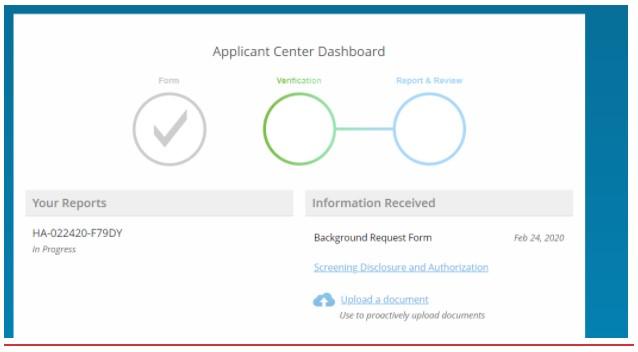
Once you are logged into the Applicant Center, depending on your hiring company’s requirements, you should be able to see the status at the very top, for example, it may look something like this:
In the case above, the report is still In Progress, in some cases an ETA may be listed.
By asking your Hiring Company/Recruiter:
In some cases, the hiring company may require HireRight to refer status-related questions back to them. Should this be the case, HireRight will advise you to contact your hiring company/recruiter for information regarding the status of your background check.
Check Status by Phone through Automated System:
Contact us by phone at 866-521-6995 – in just a few simple steps, we can provide a status update on your background check.